
The Complete Picture on Smart Doorbells: Convenience, Privacy, and Practicalities

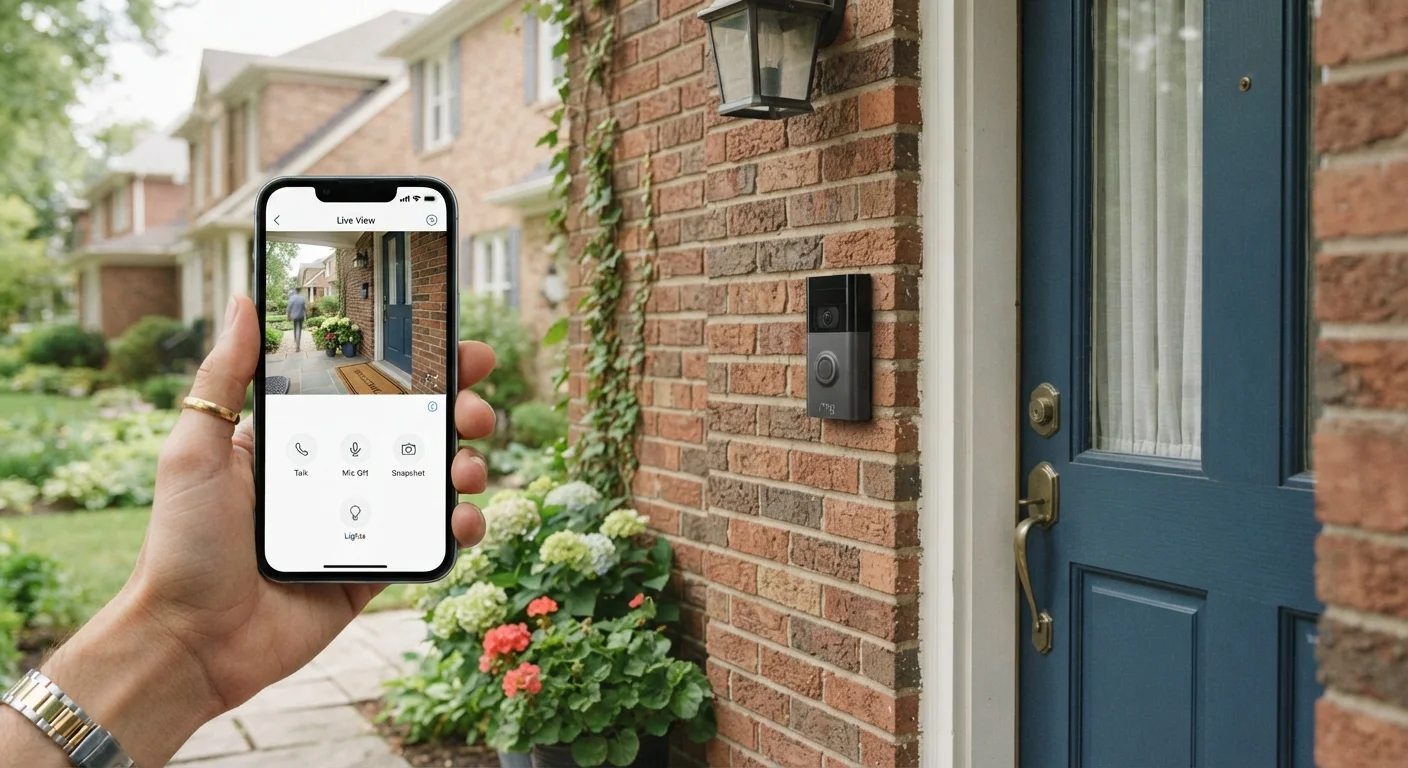
Photo: InfoAlly.net | Finding Info Made Easy editorial
Key Takeaways
- Smart doorbells let you see, hear, and speak to visitors remotely through a smartphone app.
- Battery-powered models are easier to install; wired models offer uninterrupted power.
- Most cloud video storage requires a paid monthly subscription after a short trial.
- Motion detection zones and two-factor authentication are essential privacy and security settings.
- Smart doorbells can integrate with smart locks, assistants, and broader home security systems.
What a Smart Doorbell Actually Does
A smart doorbell replaces or supplements a traditional chime button with a device that includes a camera, microphone, speaker, and Wi-Fi radio. When someone presses the button - or simply walks into the camera's field of view - the doorbell sends an alert to your smartphone, wherever you happen to be.
Through the companion app, you can see a live video feed, hear what's happening at the door, and talk back using two-way audio. This means you can acknowledge a delivery driver, tell a visitor you'll be a moment, or simply confirm no one is there before answering.
Smart doorbells sit at the intersection of convenience and home security. If you're curious how they fit into a broader connected home setup, this overview of smart home technology explains the underlying principles clearly. For a wider look at how doorbells pair with cameras and sensors, see the complete guide to smart home security systems.
~35%
U.S. households with a video doorbell
According to Parks Associates research, video doorbells have become one of the most widely adopted smart home device categories in American homes.
2-6 months
Typical battery life per charge
Battery life varies by motion activity and temperature; manufacturers generally cite this range under moderate usage conditions.
Installation: Wired vs. Battery-Powered
Smart doorbells come in two main configurations, and choosing between them shapes the installation experience significantly.
Wired models connect to your home's existing doorbell wiring - typically a low-voltage circuit running from a transformer inside the house. If your current doorbell is hardwired, replacing it with a wired smart doorbell is often straightforward: disconnect the old unit, attach the two wires to the new device, and mount it. The payoff is continuous power with no battery management.
Battery-powered models require no existing wiring. You mount the unit, insert a rechargeable battery pack, and connect to Wi-Fi. The trade-off is that batteries need recharging every one to six months depending on how many motion events occur and your climate - cold weather shortens battery life noticeably.
Test Your Wi-Fi Signal Before Mounting
Neither type requires professional installation for most homes, though you should turn off the relevant circuit breaker before touching any wiring. If your home has no existing doorbell wiring at all and you prefer a wired unit, running new low-voltage wire is a job best left to an electrician.
Where Your Video Goes: Storage and Subscriptions
A smart doorbell captures video, but where that footage lives matters a great deal for both usability and cost.
Cloud storage is the most common approach. The device uploads recorded clips - triggered by motion or button presses - to servers run by the manufacturer. Most companies offer a short free trial, then charge a monthly or annual fee to continue storing footage and access features like video history, advanced motion alerts, and snapshot capture.
Local storage is less common but available on some models. Footage saves to a microSD card inserted into the device or to a hub on your home network. There's no ongoing subscription cost, but the storage capacity is limited and the card could be stolen along with the device.
Free Tiers Have Real Limits
Before committing to any device, read the storage terms carefully. Some manufacturers limit how many days of history are included in the base subscription, and extended history costs more. Factor this into your total cost of ownership, not just the upfront hardware price. This compatibility and privacy checklist includes useful questions to ask about data practices before you buy.
Privacy Considerations You Should Know
A device that records video at your front door touches the privacy of more than just your household - it captures anyone who walks past, including neighbors, passersby, and delivery workers who haven't consented to being filmed.
Key privacy practices to adopt from day one:
- Enable two-factor authentication (2FA) on your account so that even if your password is compromised, an attacker can't access your footage.
- Set motion detection zones to limit recording to your own property rather than the sidewalk or a neighbor's yard.
- Review your manufacturer's data-sharing policies - some companies have shared footage with law enforcement under certain conditions. Understanding this policy helps you make an informed decision.
- Use a strong, unique password for your doorbell app account, separate from passwords you use elsewhere.
After initial setup, open your app's motion sensitivity settings and dial them down from the maximum - starting too high floods you with alerts for passing cars and blowing leaves, which leads most people to disable notifications entirely.
Position the doorbell at chest height (around 48 inches from the ground) rather than eye level - most cameras are optimized for a slight downward tilt that captures faces and packages on the ground more reliably.
Local privacy laws vary by state and municipality. Some jurisdictions have specific rules about recording audio without consent. It's worth checking your local regulations, particularly regarding audio recording, before enabling two-way audio features continuously.
Integrating a Smart Doorbell Into Your Home
One of the practical advantages of a smart doorbell is how it can connect to other devices you already own or plan to add.
Voice assistants: Many doorbells integrate with Amazon Alexa or Google Home, letting you announce visitors through a smart speaker or display a camera feed on a smart display screen.
Smart locks: Pairing a doorbell with a smart lock creates a front-door system where you can see who's outside and then remotely unlock the door - useful for letting in a trusted person when you're not home. This comparison of smart locks and traditional deadbolts covers what changes when your door becomes connected.
Home security platforms: Some ecosystems allow your doorbell's motion events to trigger other actions - turning on a light, sounding an indoor chime on a smart speaker, or arming a security system. Check compatibility before purchase; not all devices work across all platforms. If you're just getting started, this homeowner's starting point guide explains how devices connect and where to begin.
Practical Limitations to Set Realistic Expectations
Smart doorbells solve real problems, but they come with honest limitations worth knowing upfront.
Internet Outages Disable Remote Features
Wi-Fi dependency: If your home's internet goes down or the doorbell is too far from your router, live alerts and remote viewing stop working. A doorbell positioned at the far end of a long home may need a Wi-Fi extender or mesh network node nearby.
Notification latency: Depending on your connection speed and phone settings, the alert you receive may arrive a few seconds after the button press or motion event. In most everyday scenarios this isn't an issue, but don't rely on a smart doorbell as a real-time intruder alarm.
Field of view and night vision: Most doorbells advertise a wide field of view (typically 160-180 degrees), but physical obstructions like columns, potted plants, or deep doorbell recesses can limit what the camera captures. Night vision quality varies; test the camera at night shortly after installation to make sure it covers the area you expect.
Understanding these realities helps you configure the device well and avoid frustration. For broader context on what smart home devices can - and can't - do in everyday situations, explore the smart home tech hub.
The content on this site is for informational purposes only and is not a substitute for professional advice. Always consult a qualified professional for guidance specific to your situation.